

CppCon Notes - The Most Important Optimizations to Apply in Your C++ Programs
Performance goals
- We want to avoid unnecessary work, and unnecessary allocations
- Use all computing power
- Avoid waits & stalls
Build pipeline modifications
1. Enable compiler optimizations
-O2or-O3for optimizing speed-Osfor optimizing size
The catch: longer compile-times
2. Set target architecture
-march=native -mtune-native- forx86-mcpu=nativeforARM
3. Fast math
-ffast-math
Note: there exists -Ofast flag which is -O3 + -ffast-math + more aggressive optimizations
The catch: less precise results
4. Disable exceptions & RTTI (Run-Time Type Info)
RTTI is what allows the program to deduce types during runtime (i.e. think of base class pointers pointing to derived objects)
-fno-exceptions - disable exceptions
-fno-rtti - disable RTTI
The catch: breaks code using exceptions, limited performance gains
5. Link time optimization
C++ Build process:
.cpp files —(pre-process)—> expanded src code —(compile)—>
.s assembler file —(assembler)—> .o object file —(linker)—>executable
-flto - Optimize across translation units at link-time so we can do things like:
- Inline functions across files
- Eliminate unused functions/variables
- Merge identical functions/constants
6. Use unity builds
Normally in large C++ projects, each .cpp file is compiled separately into an object file, if each one includes the same headers, they are parsed repeatedly, compilation time grows due to this.
Unity builds is a technique where multiple C++ files are combined into a single translation unit before being compiled. This can reduce build times and enable more aggressive compiler optimizations.
set_target_properties(my_target PROPERTIES UNITY_BUILD ON) - in CMakeLists.txt or just use the flag -DCMAKE_UNITY_BUILD=ON
If you don’t want to use cmake, you can create a single cpp file like so:
#include "a.cpp"#include "b.cpp"#include "c.cpp"Then run g++ -O2 -o unity.o -c unity.cpp
7. Link statically
Static linking - produces one single executable containing everything you need to run the program. This method is more portable and has a faster startup time as you don’t have the overhead of loading external libraries.
Dynamic linking - produces a smaller executable that then has libraries loaded in at run-time. As far as I’m aware, the only benefit you get is that you can load external libraries (e.g. think like plugins in an app) without fully compiling the code again.
8. Profile guided optimization
During building, the optimizers need to make heuristics based guesses such as what branch of code (in a conditional statement) gets executed many times. But if we already profiled our code, then we don’t need to make guesses, and instead feed real data.
-fprofile-generate - compile program with profile flags and then run the program
-fprofile-use - recompile with this data
9. Try different compilers
clang, gcc, mscv, etc
10. Try different standard library implementations
11. Keep your tools updated
12. Preload with replacement library
You can override standard library functions by setting an env var:
Linux - env LD_PRELOAD=/user/lib/libSUPERmalloc.so ./program
13. Use binary post processing tools
Similar to Profile Guided Optimization in that you optimize an already-built application. LLVM BOLT is used.
C++ code optimizations
14. Constexpr everything
constexpr - can be evaluated at compile time
consteval - must be evaluated at compile time
if constexpr (compile_time_condition) {...} - indicates that this conditional must be executed at compile-time.
This is useful for templates:
template<typename T>void print(T value) { if constexpr (std::is_integral_v<T>) { std::cout << "Integer: " << value << '\n'; } else { std::cout << "Other type: " << value << '\n'; }}if consteval {...} - used to check at runtime if it’s being evaluated at compile time
constexpr int evaluate(){    if consteval {    return 100;    }    return 200;}
int main(){  constexpr int a = evaluate(); // 100  int b = evaluate(); // 200}
constinit - ensures that a global or static variable is initialized at compile time but can be modified at runtime
Note on constint and static
Note: the difference between static in a function scope and constinit is that static initialization may occur at runtime while constint initialization must occur compile time. Also constint variables don’t persist like static values in a function scope.
15. Make variables const
Copy globals to const locals (if copying is cheap)
Example of why this is beneficial with compiler hoisting:
Hoisting in compiler optimization is when the compiler moves a memory access or some computation outside of a loop so it’s only done once instead of repeatedly. This reduces memory reads, speeds up loops, frees up memory bandwidth.
int val=0;
void compute(){  int const  int s = 0;  for (int i=0; i<100000; i++){    s += i * val;  }  ...}
16. noexcept all the things
void func() noexcept {...} - this function does not throw exceptions
17. Use static for internal linkage
static - encourages compiler to inline code my keeping linkage internal
18. Use [[noreturn]]
[[noreturn]] void func(){...} - tells the compiler that this function won’t return. Useful when a function reports errors or throws exceptions.
19. Use [[likely]] and [[unlikely]]
[[likely]]/[[unlikely]] - Apply to branches to tell compiler which branch they expect to occur more likely or unlikely
20. Use [[assume(condition)]]
[[assume(condition)]] - exactly the same as assert but for optimizers (whereas assert is for programmers)
21. Use __restrict
Note: C++ support for restrict isn’t standardized, but some compilers like GCC and clang implement it as __restrict__
This tells the compiler that for a pointer, only it can access its data (this lasts for the lifetime of the pointer).
void add_arrays(int* __restrict__ a, int* __restrict__ b, int* __restrict__ out, int size) { for (int i = 0; i < size; ++i) { out[i] = a[i] + b[i]; }}The above means that pointers for a, b, and out point to non-overlapping memory, allowing the compiler to optimize each array independently (via vectorized, unrolled)
22. Make functions pure
Pure functions in c++ have the following properties:
- Deterministic - always returns the same output
- No side-effects - state outside the loop doesn’t get modified (e.g. no modifying global vars, static vars, and no IO operations)
Example of a pure and non-pure function:
// Pureint add(int x, int y) { return x + y;}
// Non-pureint cnt = 0;int increment(){ return ++cnt;}
__attribute__((pure)) - tells the compiler that the function’s return value depends on params and/or global variables (but only to read)
__attribute__((const)) - tells the compiler that the function’s return value depends on params only
See this blog post that does a great job explaining pure functions in more detail.
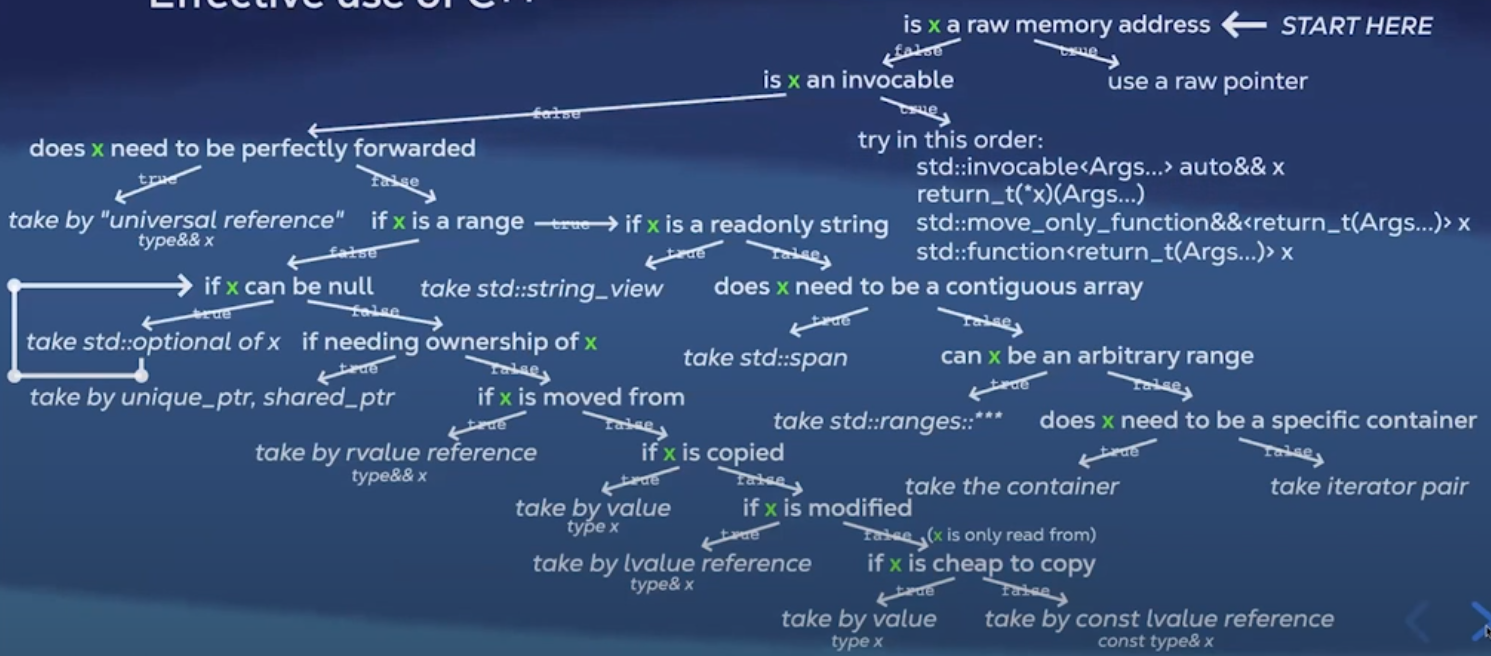
23. Take params properly
This is an excellent decision tree to choose what to take in ??? in:
call site: func(x);
declaration: void func(??? x);
24. Avoid allocations in loops
move objects out of loops (.clear() each time if necessary)
std::string line;
while (true){  // std::string line; pull out  std::getline(std::cin, line);  ...}
reserve() when size is known
std::vector<int> s;s.reserve(size);for (int i=0; i<size; i++){ if (some_check(i)) s.push_back(i);}25. Avoid copying exceptions
catch exceptions by reference
catch(auto const& e){...}
26. Avoid copying in range based for loops
for (auto const& elem : arr) {...}
27. Avoid copying in lambda captures
[&var](){...}
28. Avoid copies in structured bindings
auto const& [key, val] = *map.begin()
29. Provide ref qualified methods
Ref qualifiers are used to control the behaviour of member functions when invoked on rvalues or lvalues. This is to prevent dangerous situations such as returning a reference to a member of a temp object that would result in a dangling reference (i.e. undefined behaviour).
class Cube{public:  Cube(std::string_view str) : name(str){}  std::string const& get_data() const & {return data;}  std::string get_data() && { return std::move(data);}
private:  std::string name;};
int main(){  Box b("Bob");  std::string const& const_lval = obj.get_data();  std::string const&& rref = Box("Betty").getData();}
Without std::string get_data() && overload, you would bind a reference to a member of a temp obj if you did
std::string const& const_lval = Box("Betty").getData(); leading to undefined behaviour.
Manual hardware oriented optimizations
Virtual memory and paging

The smallest amount of memory guaranteed to be contiguous is a
page (4kb). When memory is running low, some pages may be written to persistent storage. The pages that are left in memory are called the working set.
In situations where the requested memory is not in the working set (page fault), the page is swapped in. Frequent page faults result in a performance hit (thrashing).

30. Keep working set small Retrieving pages from outside the working set is slower
because you are fetching from secondary storage. ### Caching

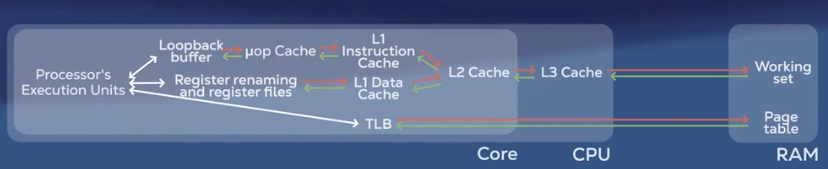
Prefetching: When data is requested, the RAM fetches a chunk of contiguous memory (i.e. cache line)
Caching: CPU has it’s own memory (L1, L2, L3) that stores the most recently used data. If the requested data is found then it’s a cache hit, otherwise it’s a cache miss and the CPU has to fetch from RAM.
31. Exploit data locality Try to use more contiguous containers ```cpp // Contiguous
containers: std::array std::vector std::deque std::flat_map std::flat_set
// Non-contiguous containers: std::list std::unordered_set std::set std::unordered_map std::map
When iterating through multidimensional arrays, prefer row-major order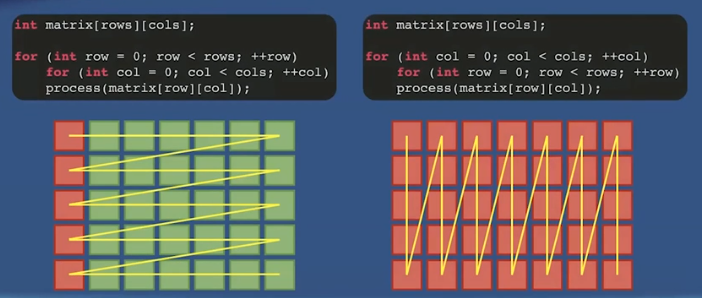
Re-order members of a class/struct to be better packed. With less padding, we would have more useful data per cache line.
Data locality can be exploited by strategically reordering members of a class/struct.
```cppstruct DebugInfo{ std::string name; size_t data; time_point creation;};
class Foo{ Obj1 obj1; DebugInfo debug; // unique_ptr<DebugInfo> debug; Obj2 const& obj2;};Suppose we know that we are going to access obj1 and obj2 frequently, and debug very infrequently. Then we can provide an indirection to the debug object via a pointer.
32. Exploit temporal locality
Set thread affinity
Thread affinity refers to pinning a thread to a CPU core so the thread always runs on the same cores instead of being scheduled freely by the OS.
Thread affinities are set at runtime and differ in implementation based on the OS.
pthread_set_affinity - Linux
SetThreadAffinityMask - Windows
Set priority of the process
setpriority - Linux
SetPriorityClass - Windows
Set priority of thread
pthread_setschedprio - Linux
SetThreadPriority - Windows
Note: Using these APIs improperly may result in degradation of OS performance
Key points for cache friendly code
- Sequential memory access
- Contiguous data structures
- Data oriented design
- SOA (structure of arrays) vs AOS (array of structures) - SOA is more cache efficient
- Entity Component Systems
- NUMA (non-uniform memory access) architectures
33. Avoid false sharing
False sharing occurs when multiple threads modify variables that are stored in the same cache line. Each time a thread writes to a variable in a cache line, the cache must invalidate/update copies of the cache line in other cores, causing slowdown of the program.
Padding
Pad data to ensure different cache lines between data accessed by two thread.
// Cache line is 64 bytesstruct data{ int a; // current line - 4 bytes char padding[60]; // current line - 60 bytes int b; // next line - 4 bytes};Alignment
alignas(X)ensures that the variable will be placed in memory starting at address that is a multiple ofXwhereXis a power of 2.
Use alignas to ensure variables are placed on different cache lines.
struct alignas(64) Data { int a; int b;};34. Use non temporal stores
You can skip comms from CPU to Cache by directly going to RAM in cases with different architectures (e.g. GPU).
Branch predictor
Modern CPUs have a branch predictor to try to guess the outcome of conditionals so CPU can keep executing instructions without stalling.
35. Avoid indirected calls
Avoiding any virtual functions, function pointers, calls to dynamically shared libraries.
36. Make branches predictable
Because branch predictors learn from history. If a branch tends to go the same way most of the time, the CPU will guess correctly.
37. Use branchless optimizations
Avoid using conditionals where possible.
38. Use SIMD intrinsics
SIMD (Single Instruction, Multiple Data) is a feature where a CPU can perform the same operation on multiple pieces of data at once. The intrinsics are functions that expose hardware capabilities.
← Back to blog